---
title: Creating and Managing Assignments with Dynamic Capabilities
description: Learn how to create and manage dynamic or frozen assignments using the AppSecEngineer learning platform’s admin dashboard, with flexible reporting and editing.
---
[Skip to content](https://help.appsecengineer.com/creating-and-managing-assignments-with-dynamic-capabilities#main-content)
English
Show submenu for translations
[](https://www.appsecengineer.com/)
- [Home](https://www.appsecengineer.com/)
- [Resources](https://www.appsecengineer.com/enterprises/blogs)
- [Course Library](https://www.appsecengineer.com/enterprises/courses)
Open main navigation
Close main navigation
- [Home](https://www.appsecengineer.com/)
- [Resources](https://www.appsecengineer.com/enterprises/blogs)
- [Course Library](https://www.appsecengineer.com/enterprises/courses)
- English
Show submenu for translations
How can we help you?
- There are no suggestions because the search field is empty.
1. [AppSecEngineer Knowledge Base](https://help.appsecengineer.com/?hsLang=en)
2. [Assignments](https://help.appsecengineer.com/assignments?hsLang=en)
3. [For Admins](https://help.appsecengineer.com/assignments?hsLang=en#for-admins)
# Creating and Managing Assignments with Dynamic Capabilities
## Admins can create dynamic or frozen assignments in AppSecEngineer with flexible team management and advanced progress tracking. Configure assignment details, submit, and monitor success using in-depth reports for effective training management.
Assignments in the **AppSecEngineer Learning Platform** are now more powerful and flexible than ever. Admins can create **dynamic or frozen assignments**, auto-manage team users, update assignment parameters even after rollout, and track progress through advanced reporting features.
### Step-by-Step: Creating a New Assignment
#### 1. Log in to the Admin Dashboard
Use your admin credentials to access the platform.

Login screen of the AppSecEngineer Learning Portal featuring secure sign-in options via Magic Link, Google, or SSO, with a visual of user authentication on the left.
From the left-side navigation, go to **Admin > Assignments**.
#### 2. Filter Assignment States
On the Assignments page, you can view:
- **Active** – Ongoing assignments
- **Expired** – Completed or time-bound assignments
- **Draft** – Unpublished and editable
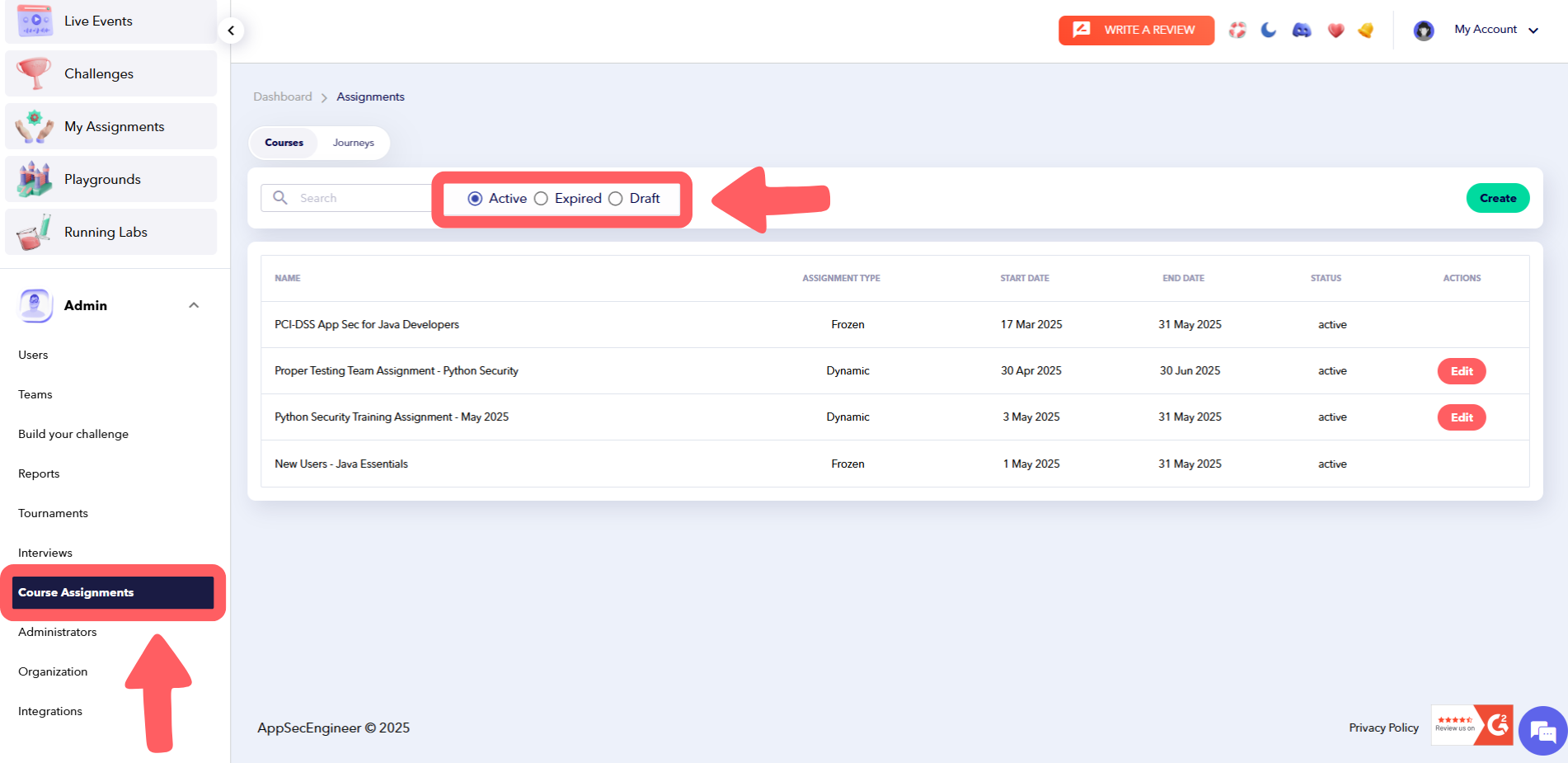 The 'Course Assignments' admin dashboard in AppSecEngineer, showing a list of active assignments with filters for Active, Expired, and Draft. Admins can create or edit course-based security training assignments from this panel.
---
### 3. Choose Between: **Dynamic vs. Frozen Assignment**
#### **Dynamic Assignment (Default)**
Dynamic assignments allow for real-time flexibility:
- Automatically includes newly added users to assigned teams
- Excludes users removed from those teams
- Editable after publishing — change **dates**, **completion %,** or **courses**
- Assign to **teams only** (not individuals)
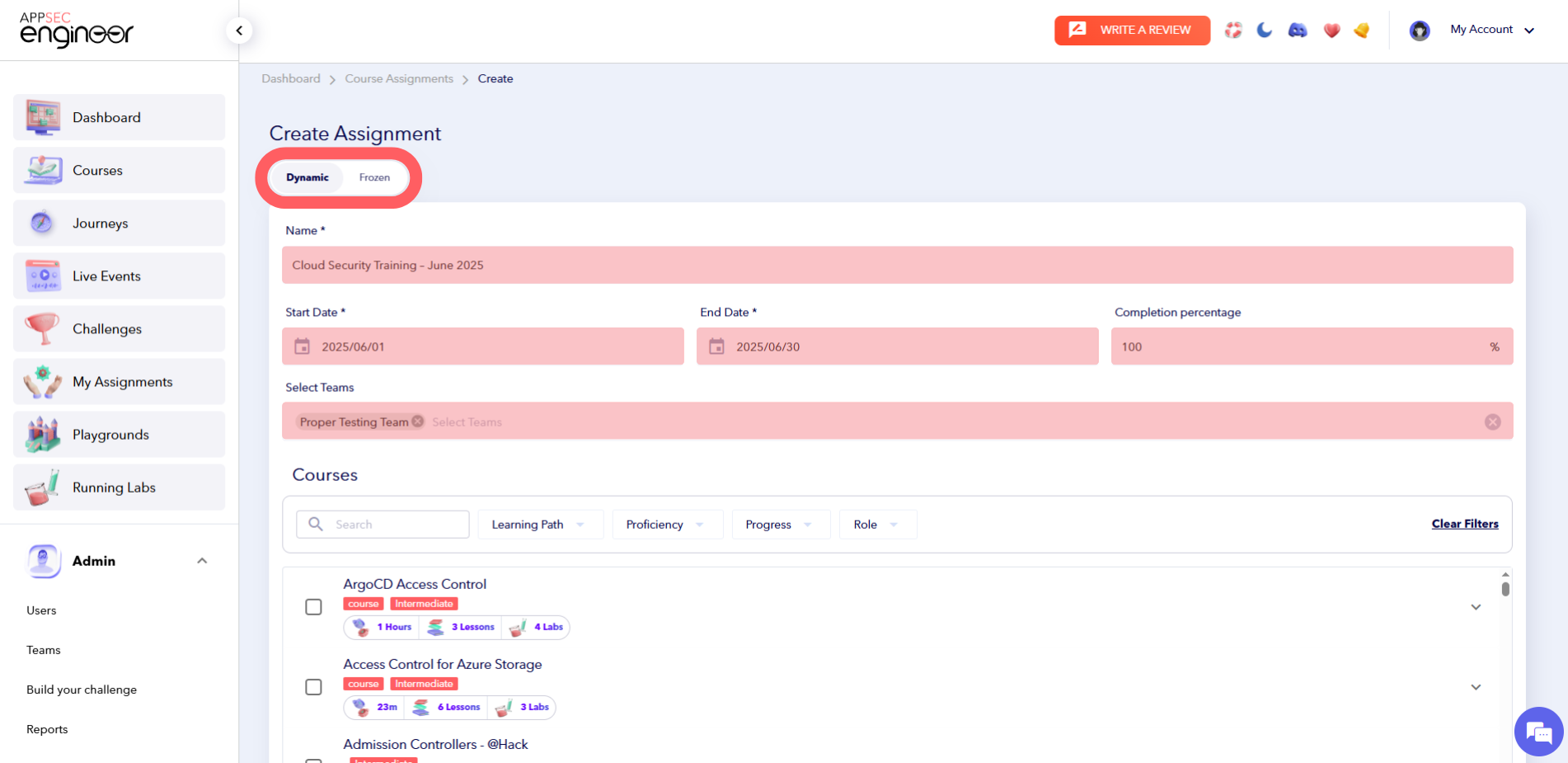 Interface for creating a new assignment in AppSecEngineer, showing Dynamic/Frozen mode toggle, date fields, team selection, and course list.
This is the most flexible assignment type, ideal for continuous learning environments.
#### **Frozen Assignment**
Frozen assignments are fixed:
- Teams and users are locked at the time of creation
- Cannot be edited once published
- Use for compliance training and fixed learning rollouts
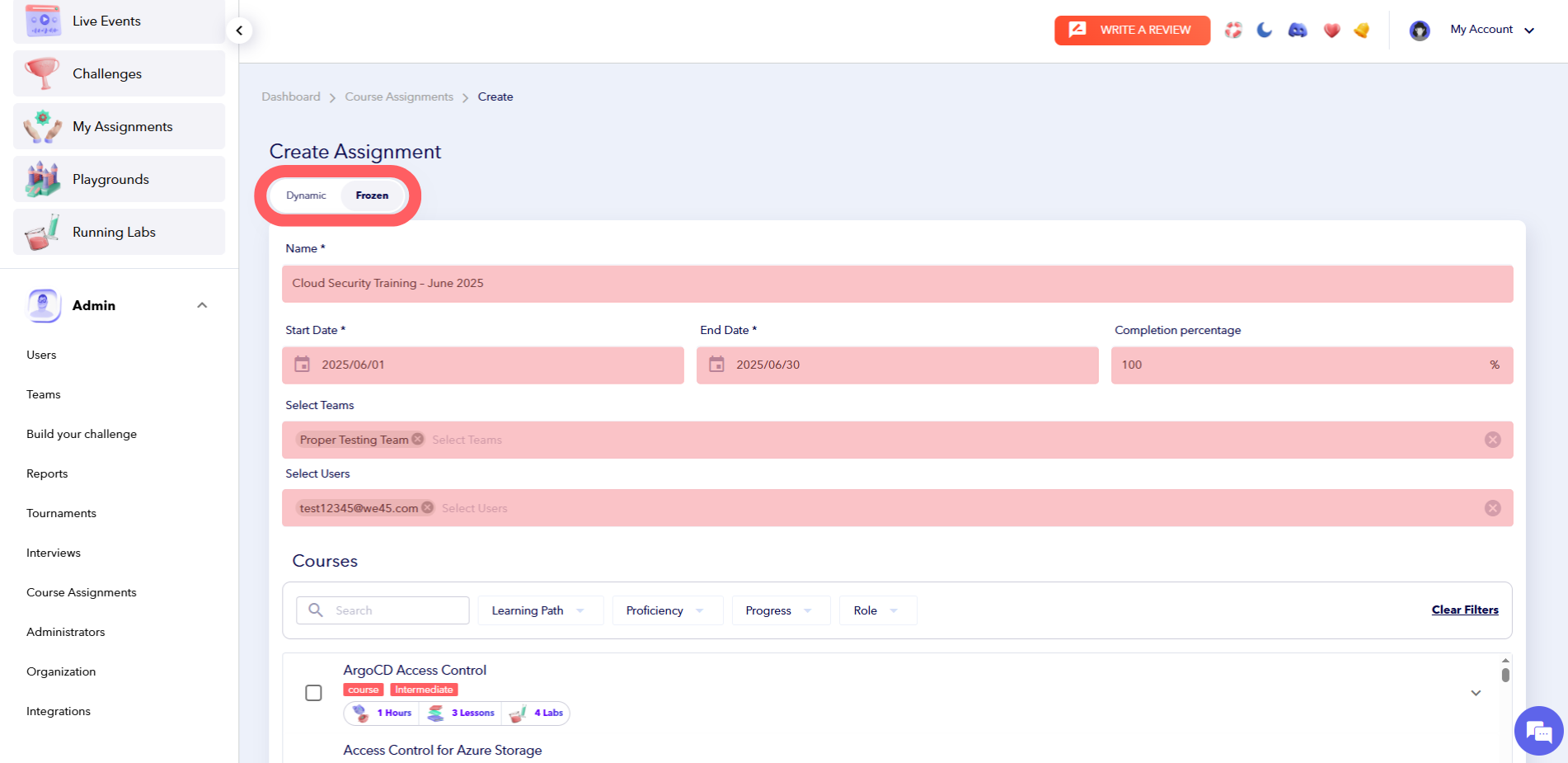 The image shows the "Create Assignment" interface in admin view with "Frozen" mode selected, displaying fields for assignment details and course selection.
---
### 4. Configure Assignment Details
- **Assignment Name**: e.g., “Cloud Security Training – June 2025”
- **Start Date / End Date**
- **Completion Percentage** (e.g., 100%)
- **Courses/Modules**: Select multiple labs or learning paths
- **Auto-Issue Badges**: Enabled by default
#### Assign To:
- **Dynamic**: Teams only
- **Frozen**: Teams and/or individuals
---
### 5. Submit the Assignment
Click **Submit** to publish. Drafts remain unpublished for further editing.
- **Dynamic assignments**: Can be edited after publishing.
- **Frozen assignments**: Locked once published.
Want to make changes later? Learn how to Edit an Assignment.
---
### 6. Track Progress with Reports
Monitor assignment success using built-in reporting:
- Progress by user
- Activity breakdown
- Engagement metrics (excellent, average, poor)
- Filter and **exclude specific users** from reports
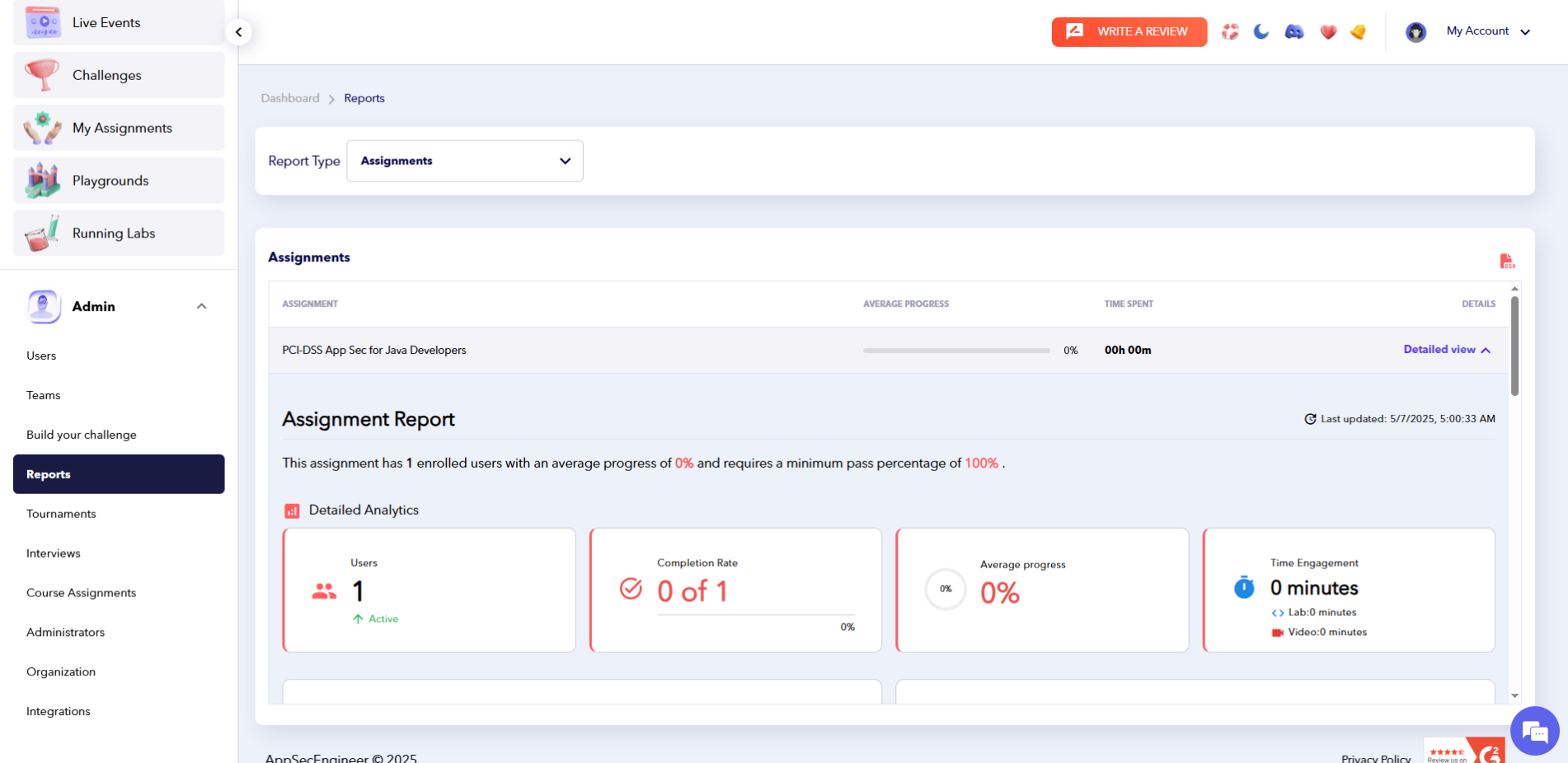 The image displays the Admin's Reports section for assignments, highlighting detailed analytics for the "PCI-DSS App Sec for Java Developers" assignment. It shows 1 active user with 0% progress, 0 completions, and 0 minutes of engagement.
Explore detailed analytics in Downloading Reports from Assignments.
---
### Pro Tips for Assignment Success
- Name clearly: e.g., “DevSecOps Onboarding – Q3”
- Align content with team roles and project goals
- Use Dynamic assignments for scalable learning
- Use Frozen assignments for audit and compliance
- [Getting started](https://help.appsecengineer.com/getting-started?hsLang=en#main-content)
- [Welcome to AppSecEngineer](https://help.appsecengineer.com/getting-started?hsLang=en#welcome-to-appsecengineer)
- [ILT (Instructor Led Training)](https://help.appsecengineer.com/getting-started?hsLang=en#ilt-instructor-led-training)
- [Onboarding Guide](https://help.appsecengineer.com/getting-started?hsLang=en#onboarding-guide)
- [Platform Navigation](https://help.appsecengineer.com/getting-started?hsLang=en#platform-navigation)
- [Quick Start Guide](https://help.appsecengineer.com/getting-started?hsLang=en#quick-start-guide)
- [Integrations](https://help.appsecengineer.com/integrations?hsLang=en)
- [Sandbox](https://help.appsecengineer.com/sandbox?hsLang=en)
- [Achievement](https://help.appsecengineer.com/achievement?hsLang=en)
- [Roadmap](https://help.appsecengineer.com/roadmap?hsLang=en)
- [Interviews](https://help.appsecengineer.com/interviews?hsLang=en)
- [Course recommendations](https://help.appsecengineer.com/course-recommendations?hsLang=en)
- [AppSecFlag](https://help.appsecengineer.com/appsecflag?hsLang=en)
- [Team Manager](https://help.appsecengineer.com/team-manager?hsLang=en)
- [Creator Studio](https://help.appsecengineer.com/creator-studio?hsLang=en)
- [Onboarding Guide](https://help.appsecengineer.com/onboarding-guide?hsLang=en)
- [Certification Pricing](https://help.appsecengineer.com/certification-pricing?hsLang=en)
- [Tournaments](https://help.appsecengineer.com/tournaments?hsLang=en)
- [Bootcamps](https://help.appsecengineer.com/bootcamps?hsLang=en)
- [Hands On Labs](https://help.appsecengineer.com/hands-on-labs?hsLang=en)
- [Users & Teams](https://help.appsecengineer.com/users-teams?hsLang=en#main-content)
- [Users](https://help.appsecengineer.com/users-teams?hsLang=en#users)
- [Teams](https://help.appsecengineer.com/users-teams?hsLang=en#teams)
- [Challenges](https://help.appsecengineer.com/challenges?hsLang=en#main-content)
- [For individuals](https://help.appsecengineer.com/challenges?hsLang=en#for-individuals)
- [For Admins](https://help.appsecengineer.com/challenges?hsLang=en#for-admins)
- [Report](https://help.appsecengineer.com/report?hsLang=en#main-content)
- [User / Team Level Reports](https://help.appsecengineer.com/report?hsLang=en#user-team-level-reports)
- [Feature Level Reports](https://help.appsecengineer.com/report?hsLang=en#feature-level-reports)
- [Assignments](https://help.appsecengineer.com/assignments?hsLang=en#main-content)
- [For Individuals](https://help.appsecengineer.com/assignments?hsLang=en#for-individuals)
- [For Admins](https://help.appsecengineer.com/assignments?hsLang=en#for-admins)
- [Learning Journeys](https://help.appsecengineer.com/learning-journeys?hsLang=en)
- [Certifications](https://help.appsecengineer.com/certifications?hsLang=en)
- [Pricing](https://help.appsecengineer.com/pricing?hsLang=en#main-content)
- [Trial & Queries](https://help.appsecengineer.com/pricing?hsLang=en#trial-queries)
- [Subscription Cancellation](https://help.appsecengineer.com/subscription-cancellation?hsLang=en)
- [Home](https://www.appsecengineer.com/)
- [Resources](https://www.appsecengineer.com/enterprises/blogs)
- [Course Library](https://www.appsecengineer.com/enterprises/courses)
[](https://www.appsecengineer.com/)
[mailto:email@email.com](mailto:email@email.com)
Copyright © 2026,